A Laptop, Electricity-
and an Internet Connection
That's all you need to have fun!
A small back-story
The following blog-post is about the importance of having a good platform to work on when you’re into computers. I remember when I was growing up, my first experience with computers was an old IBM running Windows XP that I really liked messing with by clicking random things in the screen to see what they would do.
I clearly remember my Dad system restoring it or something along those lines when I messed up a tad bit too much. I continued messing with computers but I never really carried through to get proficient till I enrolled into college which was quite unexpected as I did not exactly plan this beforehand but here I am graduating in a few months! I cannot thank enough the support I have gotten from everyone whether that is from my parents, my professor or my beloved girlfriend.
Distro-hopping and how I found what I was looking for
So let's get a bit technical and cut through the chase. Not super technical but let's see what's the fuss about distro-hopping and how it played a huge role in finding what I deem as a sweet operating system that is my little fighter which never gives up.
Ever since I owned a computer I always found myself abandoning Windows and tinkering with some Linux distribution but ultimately I never committed. In the era of COVID lock-downs I spent an unhealthy amount of time endlessly customizing or as they call it “ricing” my distro which at the time was Arch.
When I enrolled into college I found myself looking for workflows that are Linux inspired. I updated via the terminal with winget and installed a tiling windows manager called GlazeWM to maximize my productivity as I had a small laptop monitor to work with. Slowly but gradually my opinion cemented that Windows has become a bad operating system so I said my goodbyes.
I snatched a relatively new distro at the time called Omarchy, an opinionated setup for Arch-Hyprland by DHH and his team. Initially, the workflow was amazing but ultimately the constant updates and the ever so evolving environment proved futile. Constant change and stuff breaking postpones important work.
So I wiped them and got myself an image-based approach that of Aurora from Universal Blue and I have never had so much fun with an operating system before. But why Aurora and not something else?
What's a good platform?
I believe that a good platform to work on your computer is a system that does it's job and gets out of your way. You open it, do what you want to do and close it. No strings attached. A user needs to have an operating system that revolves around getting things done.
Fedora is a mature solution for image-based distributions. Based on Fedora, Universal Blue followed Fedora's image footsteps and they have released their own images as well. An atomic distro uses an image to boot the operating system, updates with a new image atomically and ultimately has roll-back images to travel backwards in case of an emergency. Pretty cool right? Now, stability also plays a vital role to get things done and these distros are good at it. User applications are logically separated from the system with flatpaks, brew for command line apps and development workflows are containerized to promote stability.
A small dive into Ublue's Aurora
Aurora is based on the desktop environment of KDE. As we previously saw it uses images to boot, update and perform rollbacks. With KDE there are a multitude of different customization options which is a huge bonus. You can make multiple desktops and quickly switch between them with shortcuts and flick applications around easily. KDE doesn’t have OOTB support for tiling windows but you can get close enough in a way with third-party plug-ins.
Aurora caters to developers by offering a specific image you can rebase to, named Aurora DX. DX stands for Developer Experience and oh boy is it a blast!
- It offers baked support for Docker, Podman and Visual Studio Code ready to kick off with Dev Containers.
- When opening a terminal you're already equipped with a wonderful command called ujust that the team has went above and beyond with it. For example, you can simply install the JetBrains toolbox with ujust and go along your way with your projects.
- Homebrew is eagerly waiting in the corner to install your most loved apps; fastfetch, lazydocker, btop and whatever else you choose!
- GUI apps are installed with flatpaks from a store named Bazaar which is polished with all the apps you need!
- DX offers many goodies for localized AI as well. With ramalama you can quickly download AI models locally and run them dockerized. You can even create a RAG with some of your books!
-
Toolbx (yes the “o” is not there) built on top of Podman is there to create toolboxes with all your favorite tools from your distro of choice. You want to
pacman -S [package]? You can certainly do so and then seamlessly access your host from that toolbx as well! No need to bloat your host with packages!
As you can see Aurora offers amazing tools to truly push the whole mindset of getting things done in a beautiful way. If it wasn't for this platform I wouldn't have been able to have so much fun when creating.
Aurora Adventures
I have ventured into a lot of different stuff since I got Aurora up and running. Some of them deserve their own blog-post while others don't.
Springboot Lost and Found Application
When I first got baptized with Java after my Python course I was a bit dumbfounded with all of the new stuff I got introduced to and I didn't like the initial verbosity of the language. Fast forward a year or so, after enrolling to another course which was about Spring, I quickly fell in love with how rules are enforced in a statically typed language like Java.
My final assignment was to create an application for users to be able to submit lost and found items with a whole bunch of functionality behind the scenes. I won't be diving into it as this deserves a blog-post of it's own or rather maybe a whole series about spring.
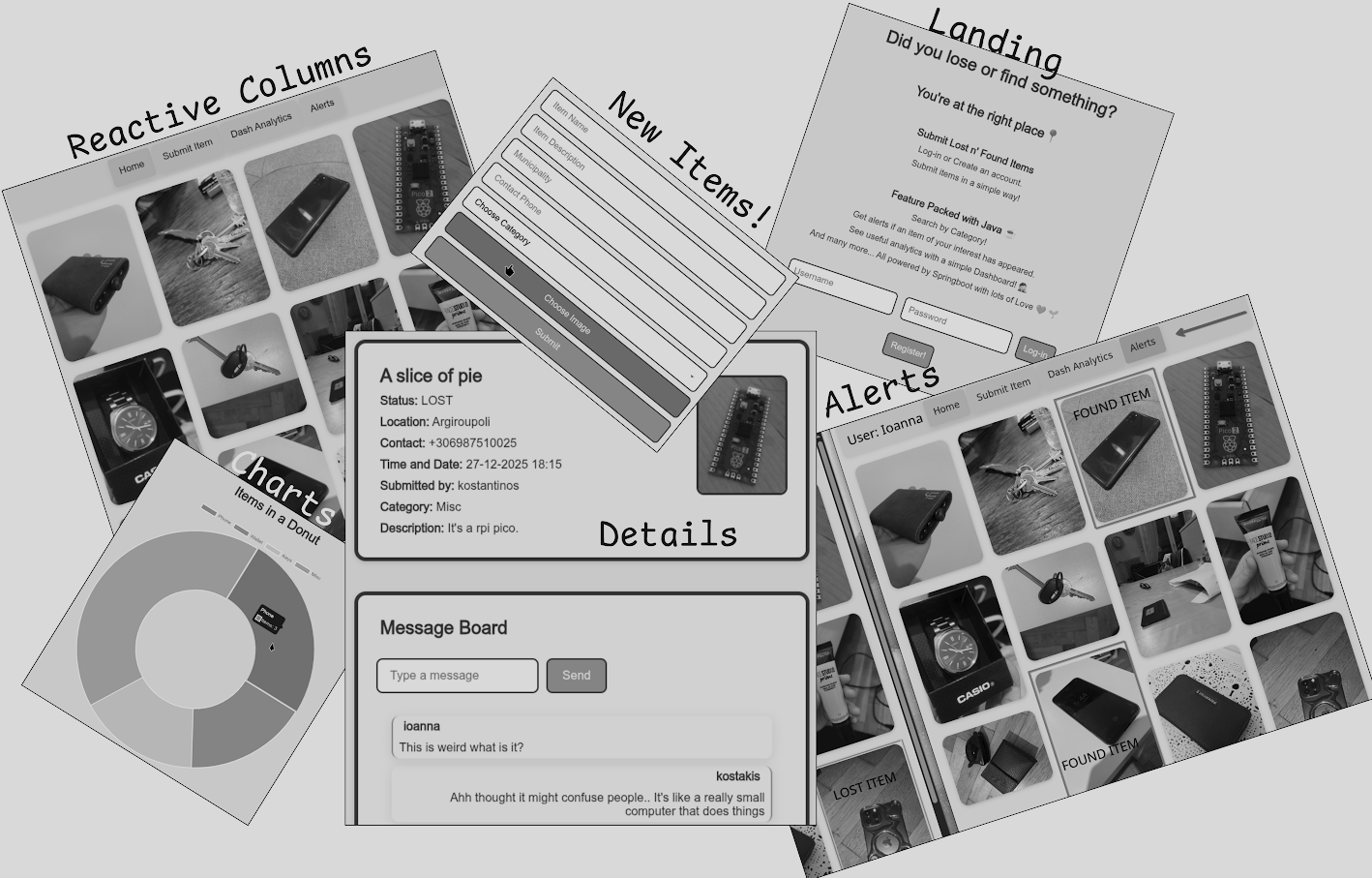
But, here is a rough collage of how the application turned out to be at least the front part of it.
Ramalama and RAGs
Ramalama gets an honorable mention. You can simply pull and run containerized models.
First, you need to pull an image of a model.
ramalama pull llama3.2
Afterwards, you can simply run it in the terminal like so.
ramalama run llama3.2
💡 You can also serve a model.
ramalama serve llama3.2 --port 8080
Additionally, you can create RAGs and attach them to your local model.
            ramalama rag "/home/directory-to-your-files" name-of-your-rag


            ramalama run --rag name-of-your-rag llama3.2
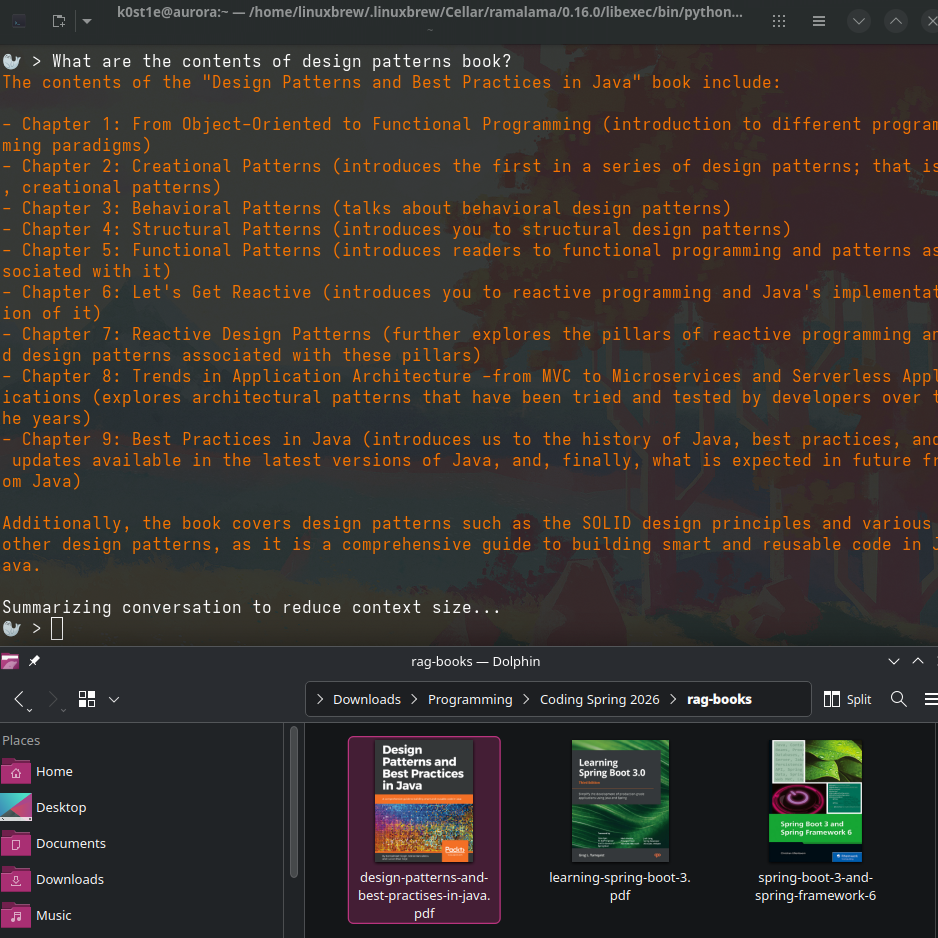
Here is how that looks like with a simple query of asking the chapter contents of a book!
Primer on PostGIS and Geospatial Data
Going into databases briefly, I discovered that there are specific extenders for databases that support geospatial data. PostGIS which is a geographical information system has the capability of extending PostgreSQL to support geospatial data such as points, lines and other more complex data types.
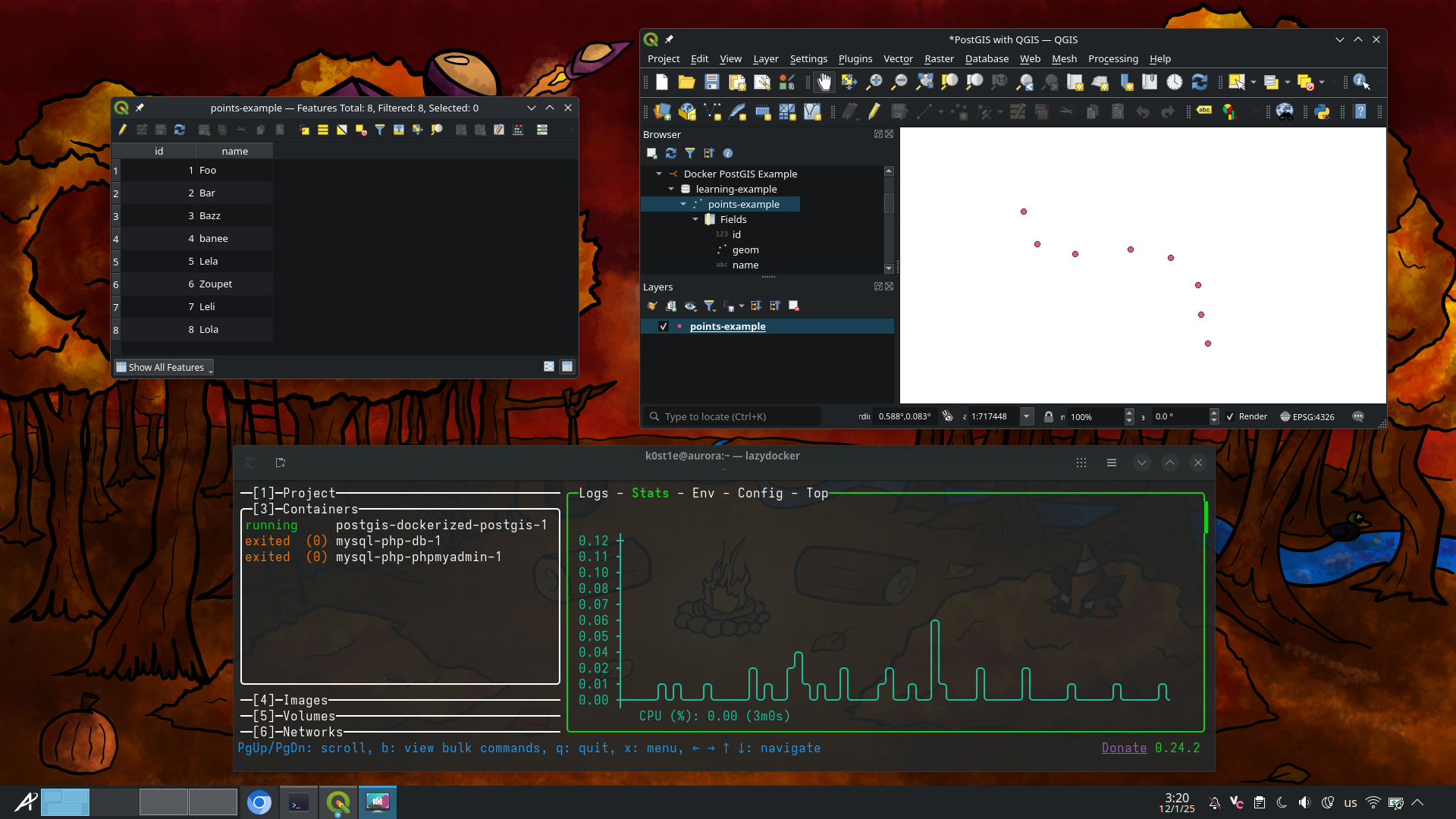
On the bottom part of the image you can see lazydocker that is used to run PostGIS dockerized. Contrary, on the top, two windows of QGIS connect to the database that in turn let's us plot some geospatial points with an easy to use interface.
Toolbx Experiments
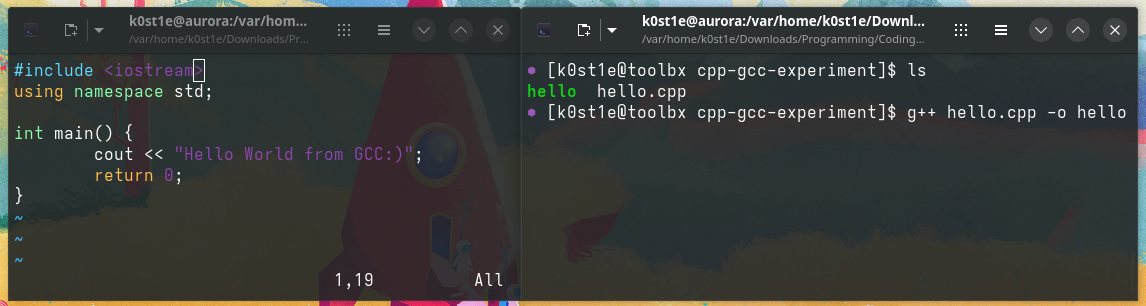
I wanted to quickly figure out a way to run g++ on my host but I figured out it wasn't there so I learned how to use toolboxes with Aurora.
You can quickly create one using the following command that pulls a fedora-toolbox image.
toolbox create
Enter the toolbox.
toolbox enter
When you're in a toolbox you can install your desired tools and have seamless access to your host as seen below.
ARM Assembly Endeavors
I want to mention LaurieWired as her short video series on YouTube inspired me to pick up Assembly and start learning the basics.
Learning about registers and their special purpose variants, software interrupts and program counters shine a whole new world!
Taking into account the following documents:
- We create a simple program that exits.
- We use the syscall name of “exit”.
-
It uses two (2) registers respectively;
r0andr7. -
The exit syscall returns
arg0 (%r0)so we can put our desired error code there withmov r0, #42. -
r7is a special purposed register. We pass the value1to it that is going to be used by the kernel to call a system call that we want to.
💡 MOV takes the destination register <Rd> which in turn takes an immediate value with the syntax of #<value>.
Lastly, we use a SWI (Software Interrupt) with the syntax of swi 0.
Here is the initial program in CPUlator, an online ARM Assembly Emulator.
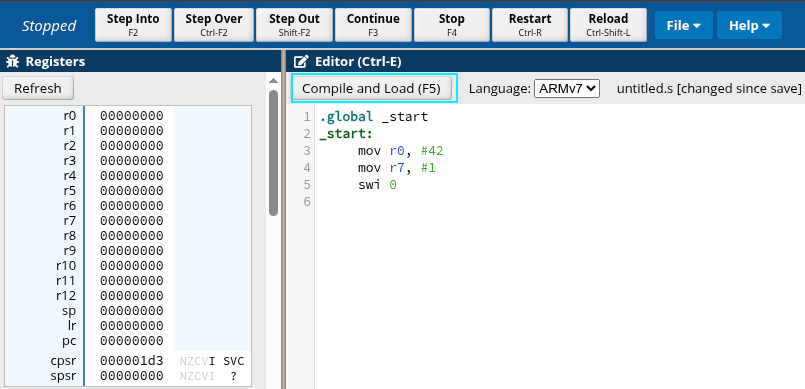
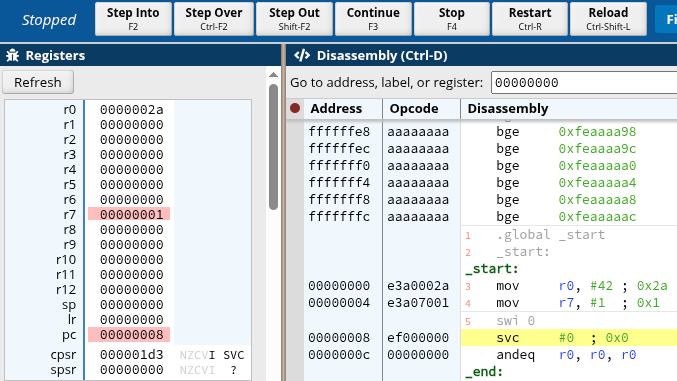
💡 Notice below the red highlighted areas. r0 has taken the value of 42 and r7 the value of 1. The program counter(pc) has incremented to the value of 8.
LazyVim!
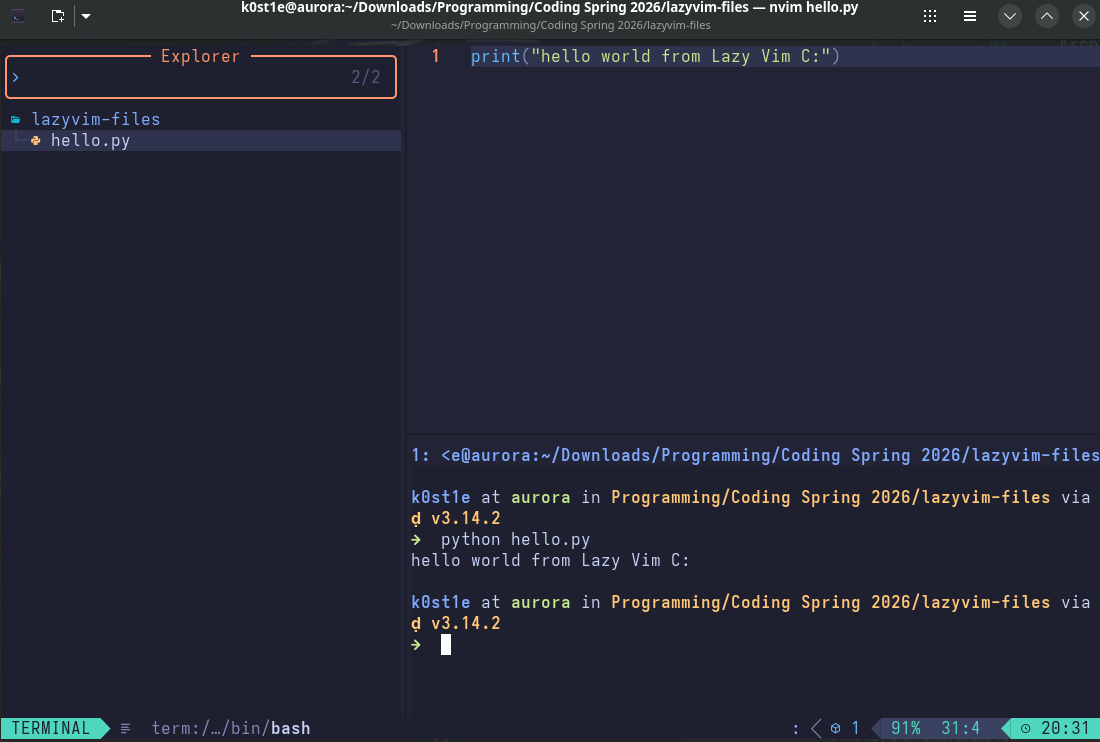
This is more of a quick shout-out of the text editor Vim that I always found out cool to use. Not everyone likes it's keybindings or how you quit! But, LazyVim is a very easy way to quickly setup NeoVim to have a file explorer inside it, tabs and an integrated terminal to quickly access when you need to. It has lots of useful documentation and it offers many plug-ins to consume!
Final Thoughts
The goal of writing is to accompany learning and an interest to write about tech. I'm on my final stretch to graduation so I might as well document and write about technology. Writing and persevering knowledge is always a good idea!
Operating Systems
Software
Miscellaneous
That's all folks. Thanks for reading!