Spring APIs ft. cats!

Docker, Docker, Docker!
As a precursor let's get Docker out of the way. It's funny that I always write about Docker so much but I really like the whole workflow around it. I decided to re-organize my files as it was a clutter.
It is a lot more coherent now with JetBrains projects in their respective folders and compose files along with volumes living in a folder all together. I guess I am collecting databases now.
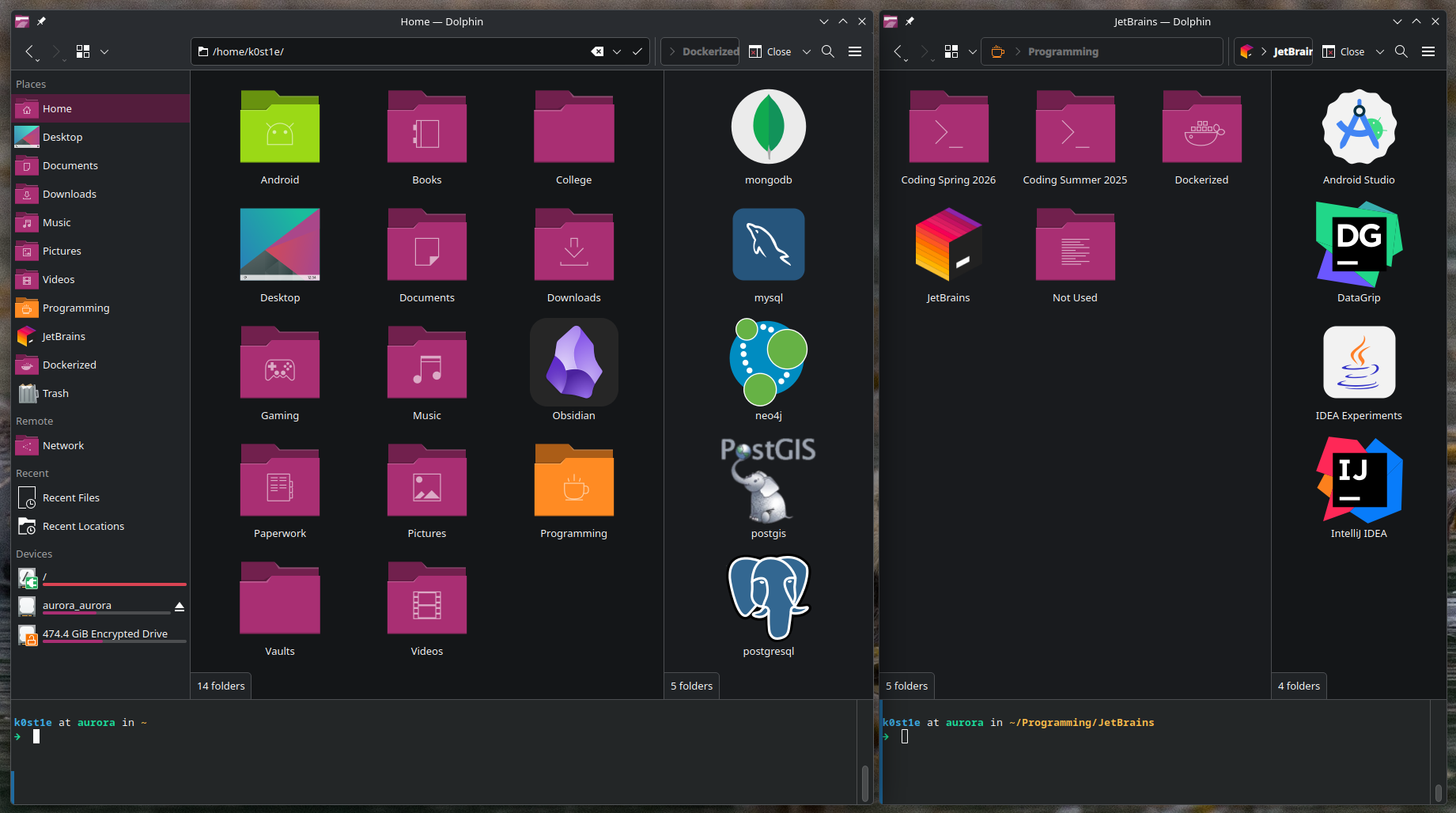
Initially for the spring app, there was H2 usage but ultimately I wanted to deploy the app so I migrated to PostgreSQL in the end. Additionally, it will prove useful in the future as I will be using PostgreSQL and possibly PostGIS for a bigger project and Heroku makes it easy to provision both.
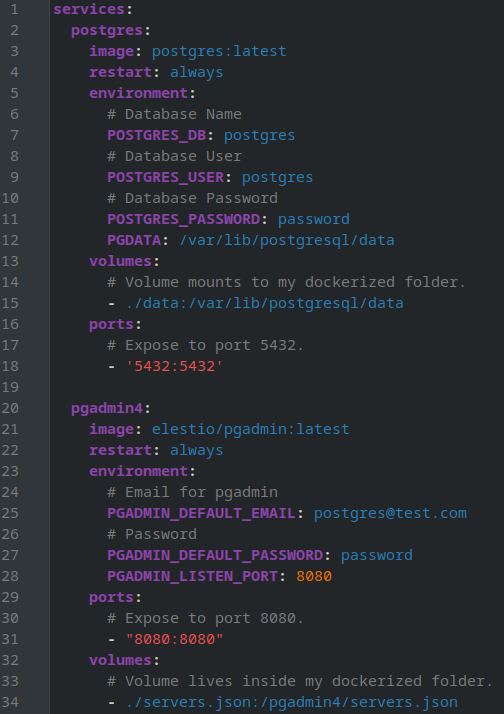
Showcased below, is the compose file used for the PostgreSQL database along with pgAdmin. Images from Docker Hub along with the YML file are linked in the end of the post.
💡 To log-in into pgAdmin you need to provide a format of an email like so: user@test.com.
💡 The volume for pgadmin4 is optional as you can just provide the server information when you log-in into pgAdmin.
💡 I like using LazyDocker when I setup everything as it easily lets you choose what to spin up. You might not want pdAdmin.
A POST Request in Spring
I wanted to do a quick revision for Java and Springboot so I went ahead and created a rather simple API and learned stuff that I had obviously missed when I was enrolled into my springboot course.
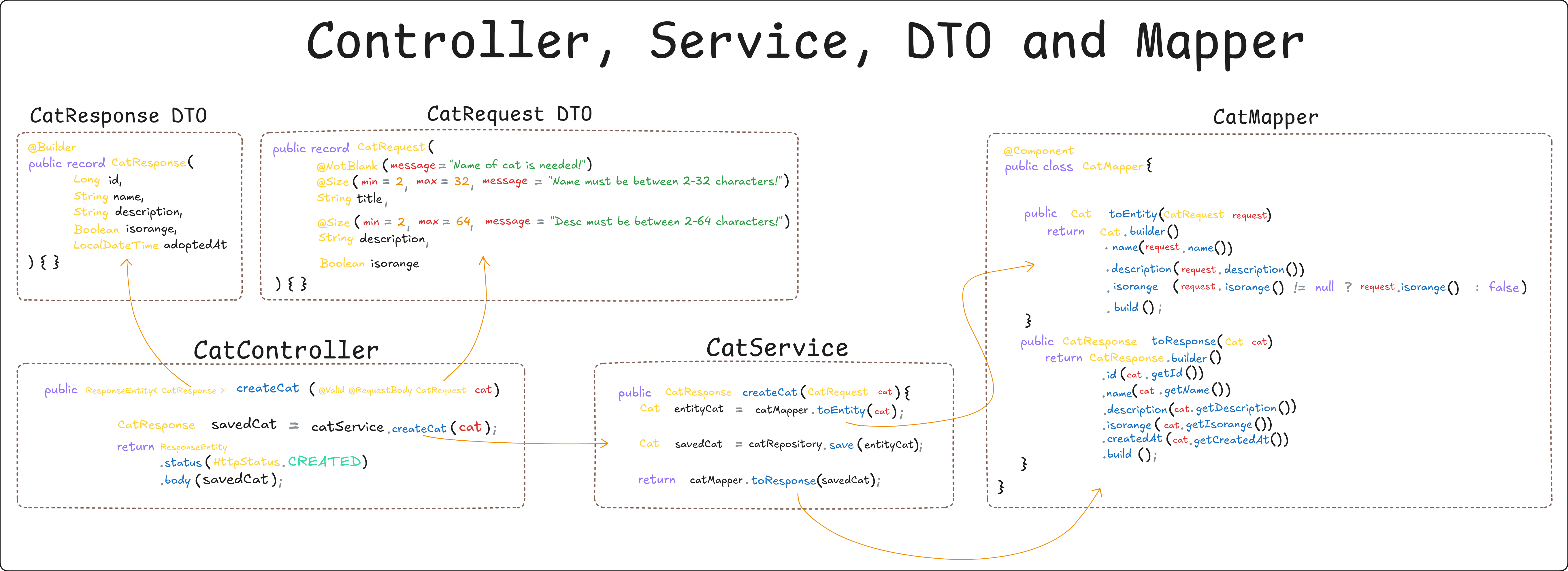
Below you can see an infographic I sketched using Obsidian and Excalidraw that showcases relationships between classes of code that I find useful in order to understand what exactly is going on when there is a POST request to create a new Cat. We'll take a closer look as there's a lot of stuff going on behind the scenes.
-
We have a
@RestControllerwith a mapping basis of/api/v1/catswhich the requests will land at. -
Specifically we will be looking at the
@PostMappingof the controller, as this suits the previous infographic that I put on for display. -
Before we look into how the controller takes a request and returns a response I want to side-track a bit and write about Jakarta Validation and it's
@Validannotation.
The .createCat() controller method has an annotation of @Valid that triggers Validation. Validation of what though? Let's dive into the CatRequest record and see what's in there and how validation works!
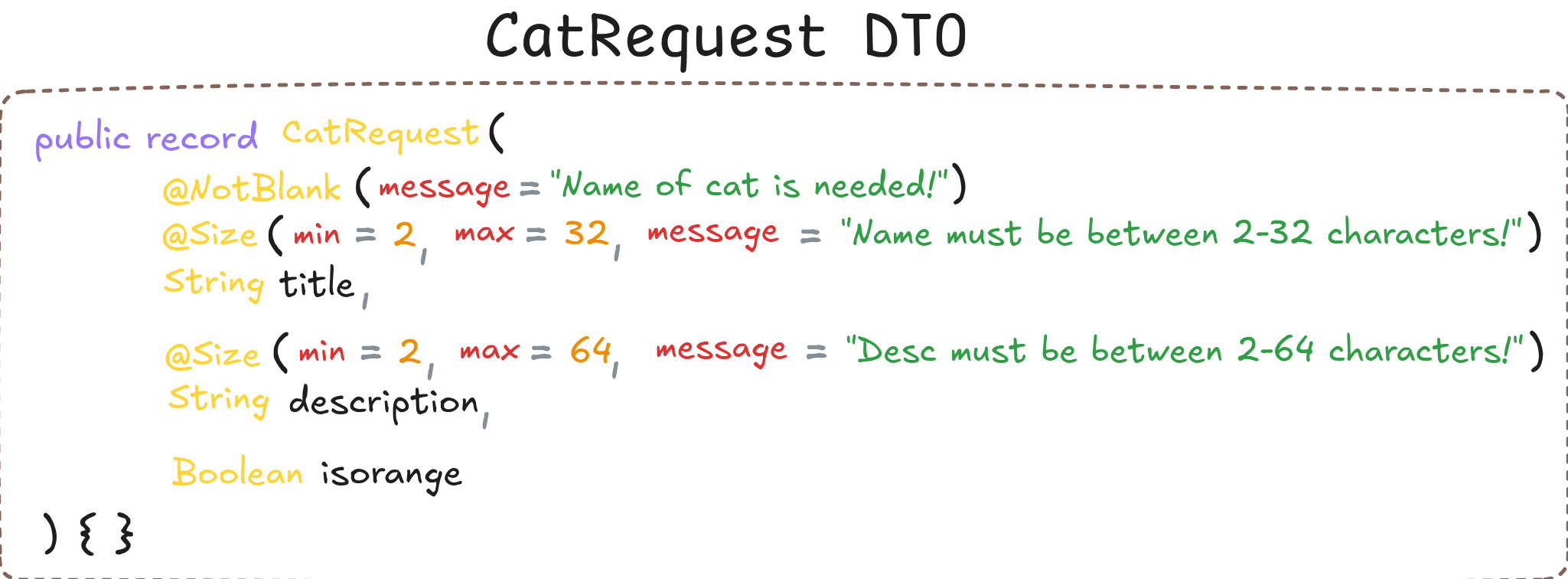
CatRequest Record Class with Validation.
- When a request is being made by the user to create a
Cat, we want to validate three (3) things. - The
titleof the cat must not be blank with the help of@NotBlank. - We also impose character limits using
@Sizefor both thetitleanddescription. - Validation is present only in the
CatRequestrecord and not in theCatResponse. - Now let's get back to the controller.
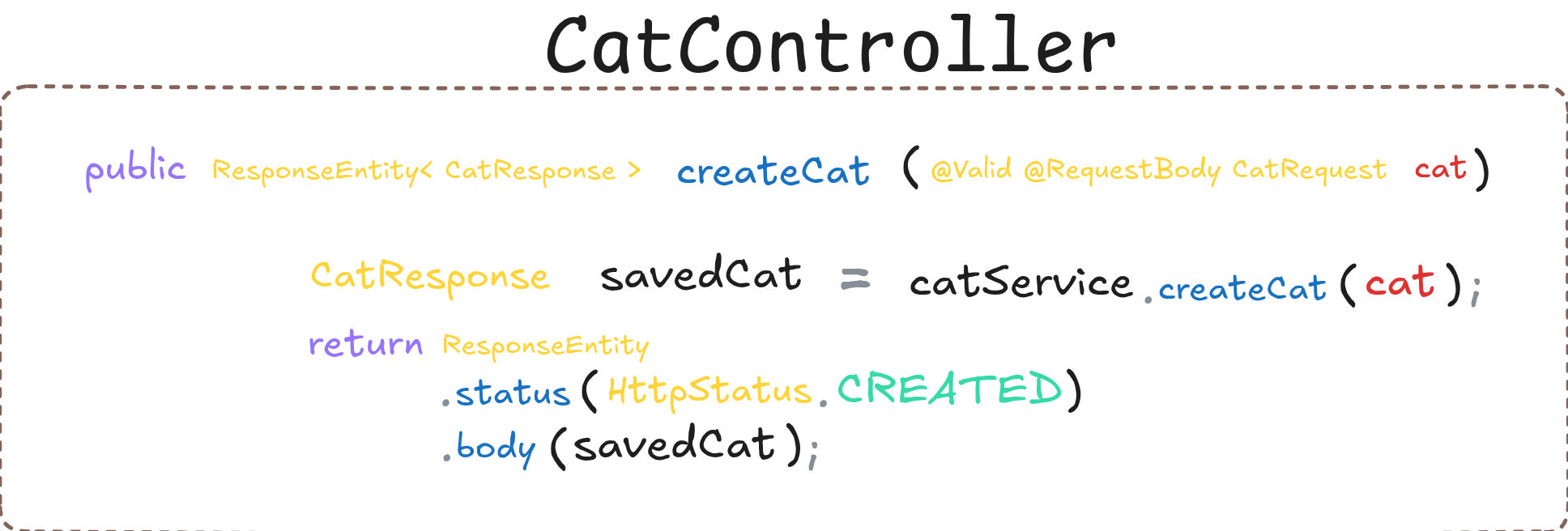
CatController class
-
The
@RequestBodyautomatically deserializes the body of the HTTP request into theCatRequestobject. -
The contoller's return type is a
ResponseEntitycontaining aCatResponse. -
Then, with
CatSevicewe create a newCatin the database which we will see how that works below. -
In the end, we return a
ResponseEntitywith the body containing thesavedCatwhich is aCatResponse. -
Let's continue with the
.createCat()service method to make things a bit more clear.
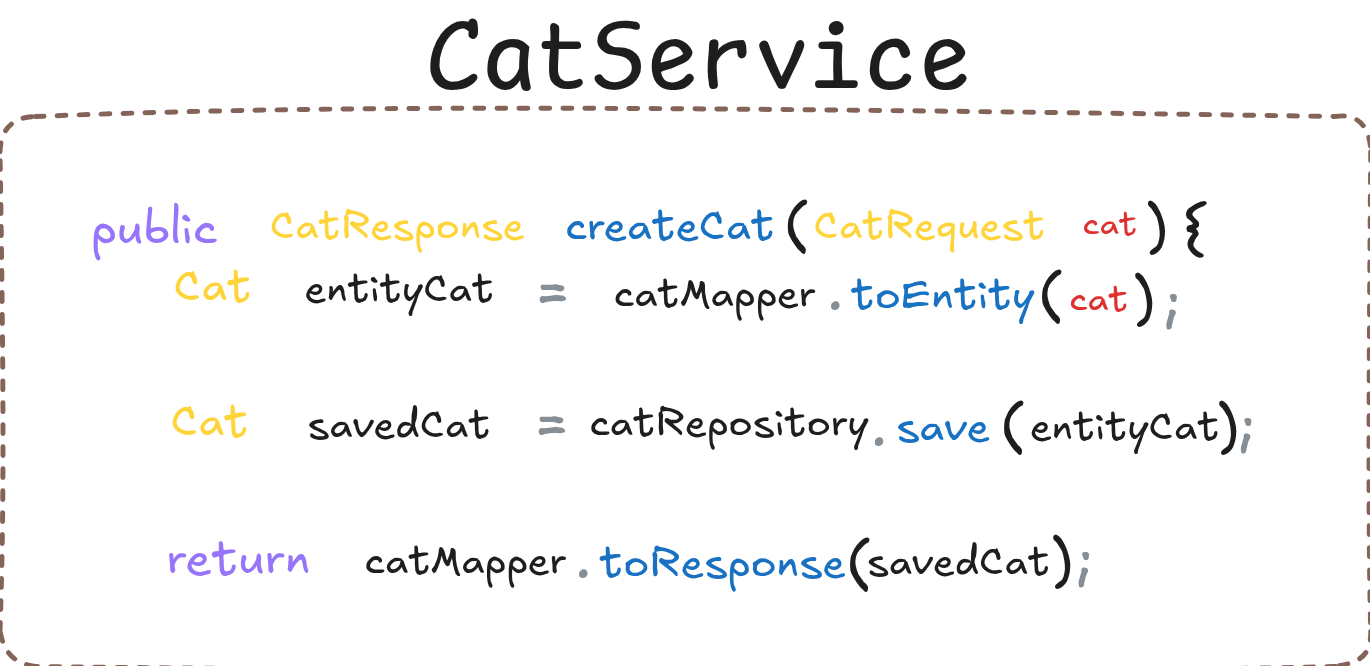
CatService class
-
The method accepts a
CatRequestand it's return type is aCatResponse. -
We make a new
entityCatof typeCatthat is aCatRequestwhich is mapped into an entity with the help of a mapper. -
Then we save the
entityCatusing the RepositorycatRepository. -
Lastly, taking the
savedCatwe use the Mapper again to map thesavedCatinto aCatResponse.
Since the Service layer has two (2) methods being used to map a request into an entity and an entity to a response let's take a look at those two methods as well.
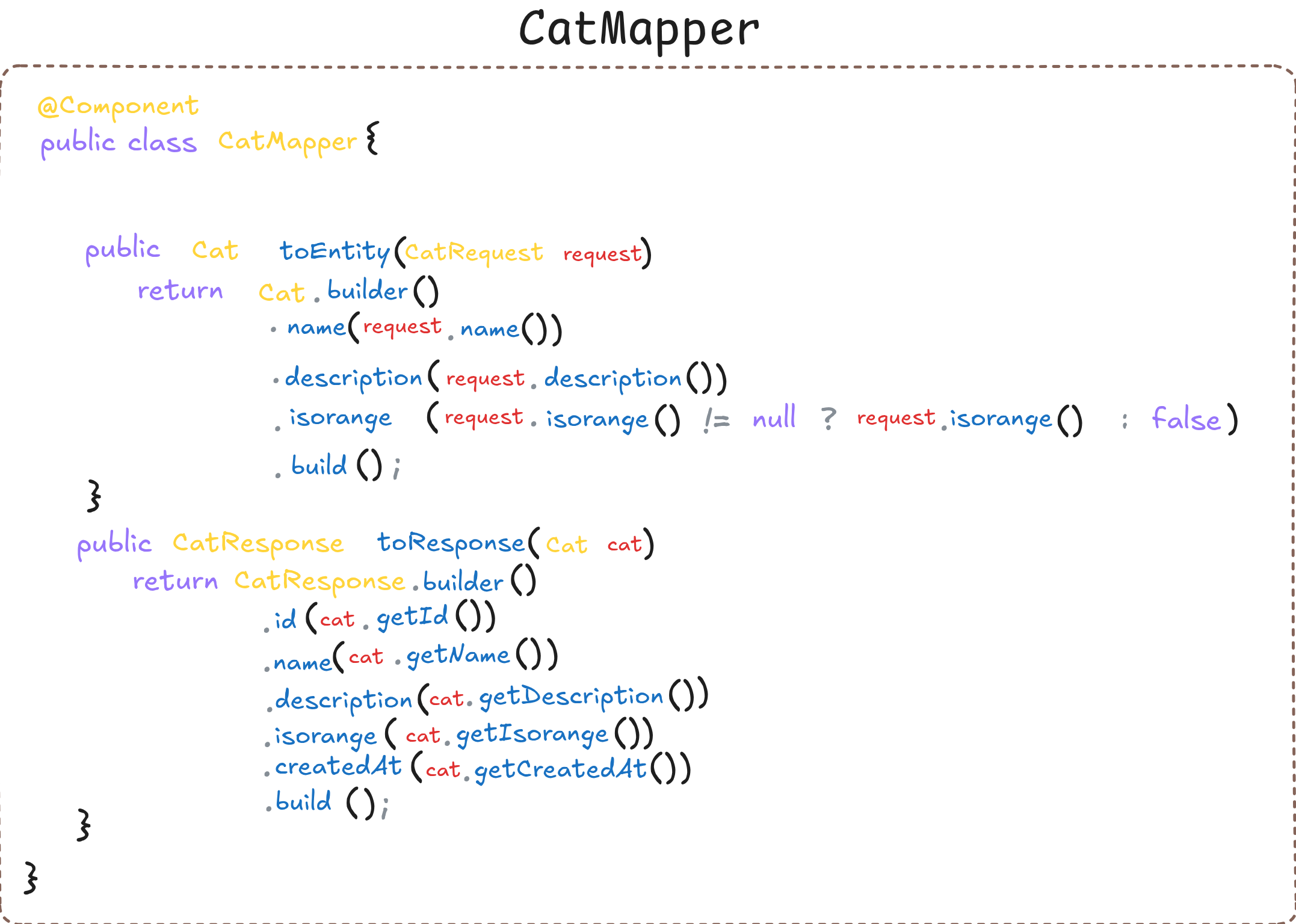
CatMapper class
-
In both methods of the mapper we use
@Builderfrom Lombok to quickly construct instances. This is possible as the entityCatand the recordCatResponseare annotated with@Builder. -
!= null ? request.isorange() : falseensures that null is accounted for as well. As long asisorangeis not null the ternary hitsrequest.isorange()otherwise we havefalse.
Thoughts
Separating code to different files and packages makes everything neat and organized. When coding, it is important to have a place where each corner is responsible to do something specific. A controller should handle requests and should not be cluttered with business logic. A mapper maps. A repo repoes and so on.
Spring-wise, it is quite interesting that parts of your code are inverted in regards of control to be handled by the spring container. Paired with DI(dependency injection) you get instances of your beans where they're needed and everything becomes easier. Spring really does the heavy lifting behind the scenes!
Heroku and Deploying
Now let's deploy the API to Heroku! It's pretty simple actually and the docs are a breeze. Heroku provides 312$ worth of credits if you're a student and enrolled into the GitHub Student Developer Pack which is suprisingly easy to do so. No brainer. Let's see how we can deploy our app now.
- First, we need to install the Heroku CLI. Personally, I did it with homebrew. Don't forget to login into the Heroku CLI before you start doing anything else.
-
Now, in our IntelliJ IDE, we have to initiate git with
git init. -
Afterwards, we add the files and commit with
git add .andgit commit -m "first commit!"respectively. -
Almost there! We create the app and push our code like so:
heroku createandgit push heroku master.
That's all. The app is now deployed but we still do not have a PostgreSQL database so let's do that as well. Heroku makes it easy.
- There are a lot of extras to complement your deployed application in Heroku. They are called add-ons.
-
To provision a database of Postgres we can do so by doing the following:
heroku addons:create heroku-postgresql. -
You do not necessarily need to provide the database URL, username and password as Heroku will automatically populate the environment variables as long as the PostgreSQL driver and the springboot starter jdbc dependencies are present in the
pom.xmlfile :)
Testing with HTTPie
- HTTPie is an API testing platform where you can create HTTP requests that I will be using today.
- Multiple different platforms exist that serve as an API testing platform to work on. Postman is a very popular choice.
- Let's test the Cat API that we have now deployed on Heroku.
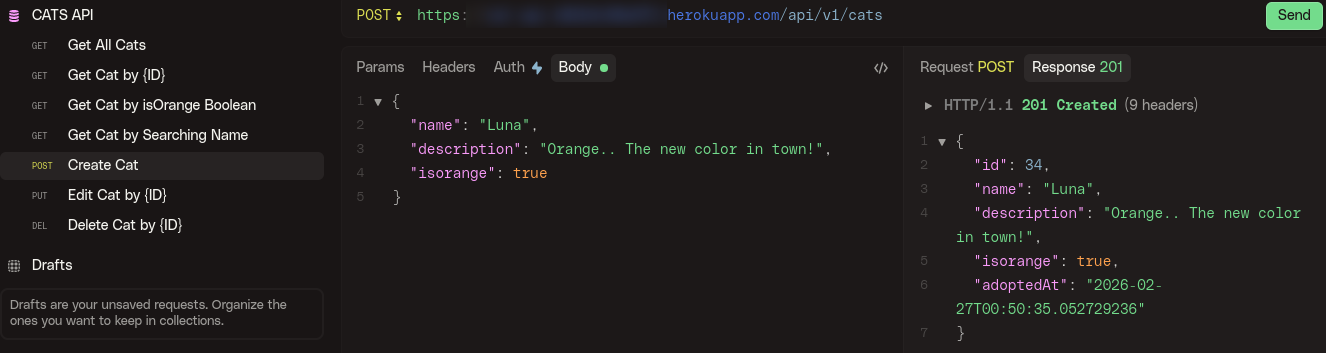
As you can see the POST request on /api/v1/cats responds with the new Cat we have created!
References
- DockerHub: pgadmin
- DockerHub: postgres
- YML Docker Compose File
- GitHub Repository
- GitHub Repository: API README
- Postman API Testing Platform
- Deploying Springboot Apps to Heroku
- GitHub Student Developer Pack
- Heroku for GitHub Students
That's all folks. Thanks for reading!